
User manual · Chapter 13
Metadata and Lightroom
The tags, places, events, titles, crops and rejects you set in Photo Flux aren't locked inside the app. They are written into the photos in the standard forms Lightroom, Bridge, darktable and Google Photos read.
Where your metadata goes
| File | Where location, tags, event and title go | Tier |
|---|---|---|
| JPEG | Into the file itself: standard EXIF GPS plus an embedded XMP packet | Free |
| DNG | Into the file itself, as Adobe's own software does — a DNG never gets a separate sidecar | Free |
| Other RAW (ARW, NEF, CR2, CR3, RAF, ORF, RW2 …) | Into an .xmp sidecar beside it. The RAW itself is never modified | Pro |
| HEIC / HEIF | Not written | — |
Both switches are under Settings → Operation: Embed metadata in JPEGs and DNGs (on by default) and Enable XMP sidecar (RAW). The photo's App tab says which applies to it: Embedded in the file, in an XMP sidecar, or not written.
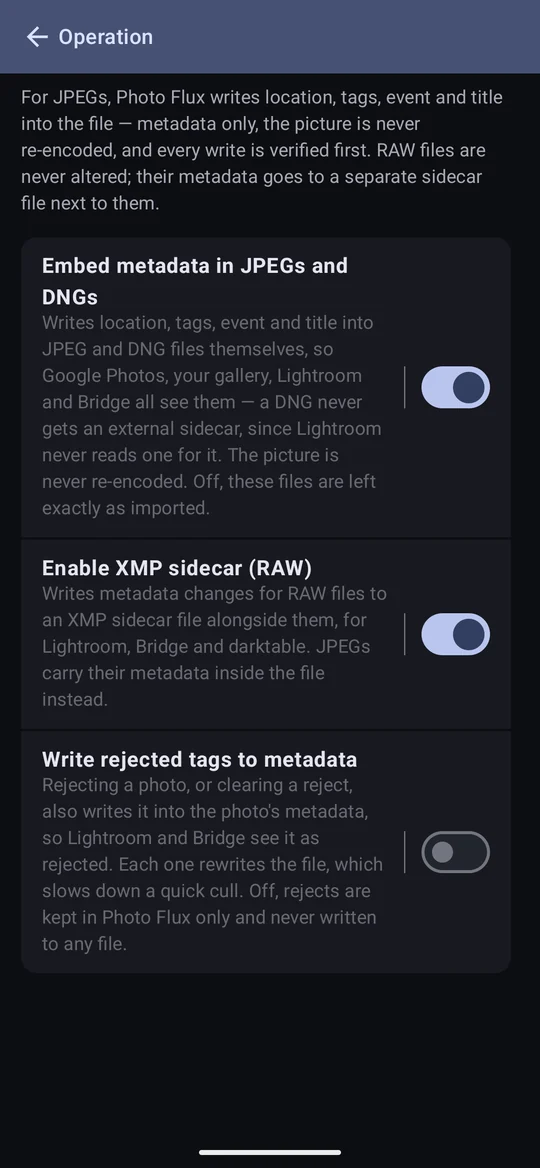
Writing into JPEG and DNG files
- The picture is never re-encoded. Only the metadata is changed, byte for byte.
- Every write is checked before it replaces the original: the file must still open, the decoded image must be unchanged, and no other metadata may have been touched. If anything fails, the original is left exactly as it was.
- Because it is in the file, the location and keywords show up wherever the photo goes — Google Photos, the phone's gallery, Lightroom, Bridge.
- A
.xmpthat was already beside a DNG (written by darktable, say) is left alone, and read as a fallback the first time a DNG with no embedded packet of its own is edited.
XMP sidecars for RAW Pro
An XMP sidecar is a small text file beside the photo — an Adobe/ISO standard, not a Photo Flux invention. Lightroom Classic, Adobe Bridge, Camera Raw/Photoshop and darktable all read it, so the work you do here travels with the photos.
- Named the Adobe way:
IMG_1234.ARWgetsIMG_1234.xmp. A RAW+JPG pair shares one sidecar, as Lightroom treats it as one photo. - Only when there is something to put in it. A photo with no location and no tags gets none — but a geotagged import writes one automatically, since the place counts.
- A sidecar from another tool is merged, not replaced. Develop settings, ratings and crops from Lightroom or darktable survive; Photo Flux changes only its own properties. If a sidecar can't be read at all, it is left untouched and the change is kept in Photo Flux only.
- A RAW's existing sidecar comes with it. If a RAW on a card or drive (or a connector)
already has a
.xmp— from Lightroom, Bridge or darktable — it is copied across unread and unaltered at import, so develop settings, stars, colour labels and keywords survive, and Photo Flux's own properties are then merged in. A camera over USB has no sidecar files to find. - Sidecars travel with an export, beside their photos, and are always re-sent, since their content changes whenever a tag or location does.
- The viewer's IPTC tab shows what the sidecar actually says, read back from the file — what Lightroom would see. For a photo with none, it offers to create one.
- On Free, sidecars stop being written but existing ones stay, and are still read by other software.
Rejects that travel
With Write rejected tags to metadata switched on, rejecting a photo writes it into the photo's metadata (a JPEG or DNG's own file, a RAW's sidecar) in the form Lightroom, Bridge and Camera Raw read; clearing the reject writes that too. It is off by default because rewriting a file on every reject slows down a quick cull. Off, Photo Flux never writes or clears a reject in a file.
- The reject is the standard rating of −1, so it replaces any star rating on the file. Clearing the reject puts the rating back — Photo Flux remembers it even though the file can't.
- Reading is always on, and free: a file that arrives already flagged by another tool imports as rejected — including a RAW rejected in Lightroom through its sidecar.
- Photo Flux doesn't set star ratings, and only touches one to write or undo a reject. A camera's own "unrated" (Canon writes 0 into every CR3) isn't treated as a rating.
Rebuild metadata
Actions → Set metadata → Rebuild metadata rewrites the selected photos' metadata from what Photo Flux knows. Use it to:
- give sidecars to photos imported before they were switched on;
- repair a sidecar deleted or damaged outside the app;
- push a whole cull's rejects out at once, after switching on Write rejected tags;
- apply a named location to photos imported before you named it.
It merges rather than replaces, so it is safe to run again.
Rescan metadata
Actions → Rescan metadata is the other direction: it reads the reject flag back in from the files, so a cull done in Lightroom since the import shows up here. It reports how many photos it changed — usually none, they already matched.
It also checks that each photo's file is still there. A photo whose file has gone — deleted outside Photo Flux, cleared by Google Photos' Free up space, or left behind by an interrupted delete — still shows in the gallery, because its thumbnail is kept. The rescan says how many it found and offers Remove from gallery or Keep. If the storage itself can't be reached (an SD card taken out), the check is skipped rather than offering to remove everything.
What Photo Flux reads
- EXIF from every supported format: camera, lens, ISO, shutter, aperture, focal length, dates, GPS and more.
- IPTC from JPEG and the TIFF-based RAWs (ARW, NEF, CR2, DNG, ORF, RW2, PEF, SRW, 3FR) and CR3. HEIC and RAF give none — not an error, just not readable yet.
- Keywords are shown, and link to a tag of the same name if you have one; they never create tags.