 Forget Me Not
User manual · Chapter 8
Sharing a reminder
One reminder, in one small file, sent however you like — and opened by whoever gets it into an editor rather than straight into their list.
Sending one
There are two ways in, and they do the same thing:
- ⋮ → Share on the reminder's row on the itinerary.
- The share button in the top bar of the reminder's editor.
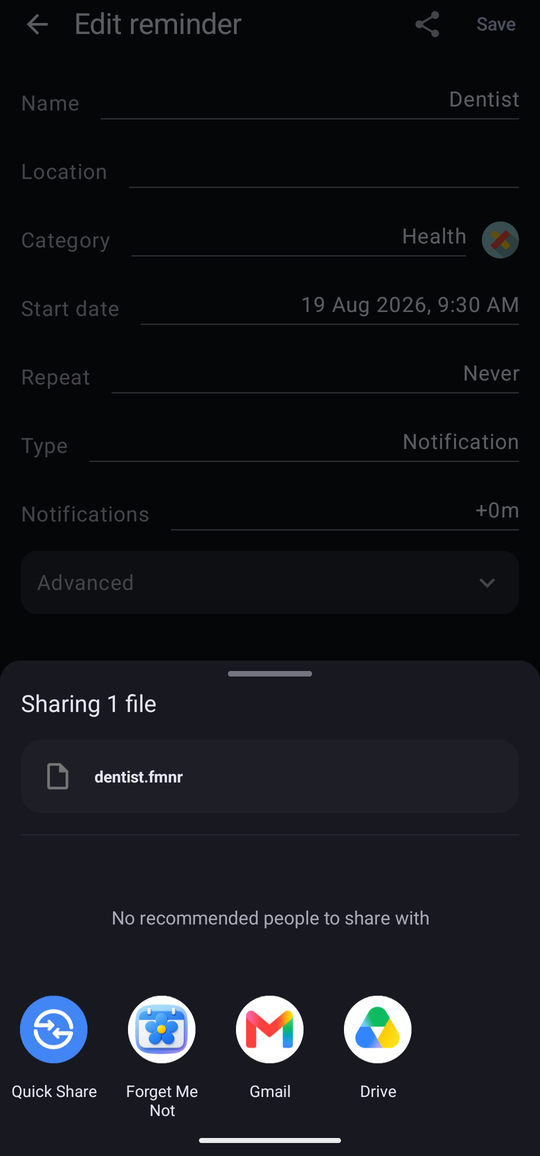
Either produces a small file named after the reminder — dentist.fmnr — and hands it
to Android's share sheet. From there it goes wherever you send things: a message, an email, a chat
app, a cloud drive, or straight to another device.
What travels with it
The file carries the whole reminder, not just its name and time:
- The name, location, date, time, whether it is all-day, its repeat and its type.
- Every notification set on it.
- Every field on it, with its value — and the definition of that field, so the person receiving it does not have to have invented the same field first.
- The name of the category it is filed under, and its icon.
It is a moment in time that travels, not a subscription. Changing your copy afterwards does not change theirs, and there is no link between the two.
A reminder sent across a time zone is shown to the recipient in their own time, with a line saying where it came from. Nobody has to do the arithmetic.
Receiving one
Opening a .fmnr file — from the message it arrived in, or from the Files app —
offers Forget Me Not. It does not quietly add the reminder. It opens an editor,
headed Shared reminder, explaining where it came from:
“Sent to you by someone else. Change anything you like, then Save to add it.”
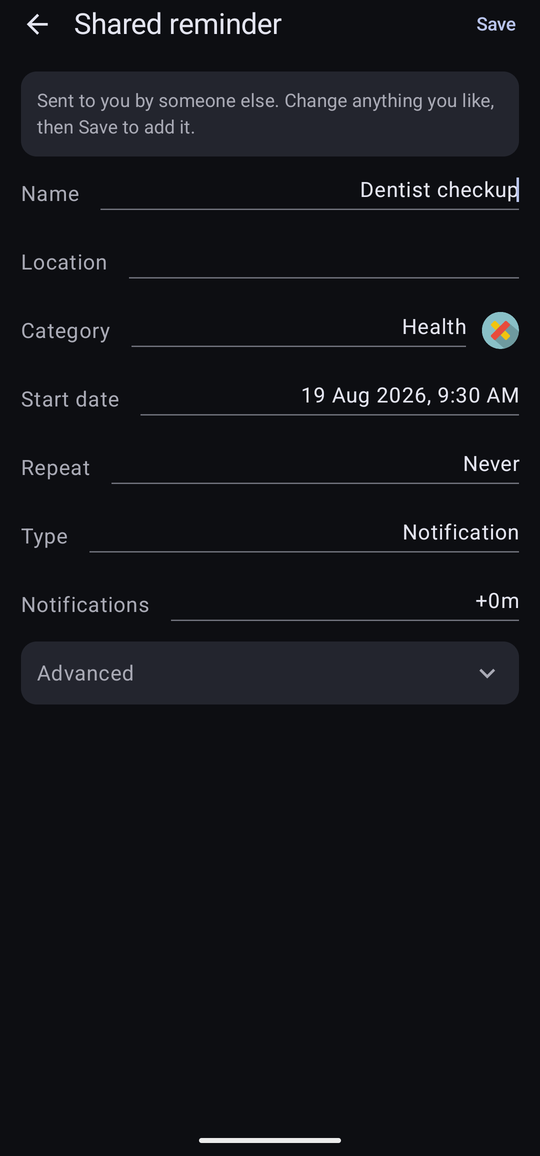
Nothing is written to your app until you tap Save. Somebody else's reminder arriving on your phone is an offer, not an instruction.
When something is missing at the other end
The app is explicit about anything it had to make up or could not resolve.
| What you see | What it means |
|---|---|
| Fields added to hold what came with it: … | The reminder carried fields you had not defined, so they were created for you. They are ordinary fields afterwards, and appear on the Fields screen. On Free this line is not shown — the fields and their values are still kept in full, but naming fields you cannot open would only send you looking for them. |
| Filed under “Holidays”, which you haven't got. | The category does not exist on your phone. A Create button beside the message makes it, icon and all — or pick one of your own from the Category row instead. |
| That time has already passed. Pick a new one before saving. | The reminder was sent for a moment that has since gone. Choose a new date or time and it will save. |
| There's already a reminder with that name at that date and time. | You already have this one. Change the name or the time if you want a second copy. |
When a file will not open
A file that is not one of ours — the wrong attachment, or one damaged in transit — is refused with Can't open that reminder. Nothing is partially imported and nothing in your app is touched. Ask for it to be sent again.