 Forget Me Not
User manual · Chapter 13
Free and Pro
Forget Me Not is free, and stays free. A handful of features are part of Pro, which is one payment. This chapter says exactly which is which.
What Free is
Free is not a trial, a demo or a teaser. There is no countdown, nothing expires, there are no adverts, and nothing about you is measured. An install that is never paid for goes on working indefinitely.
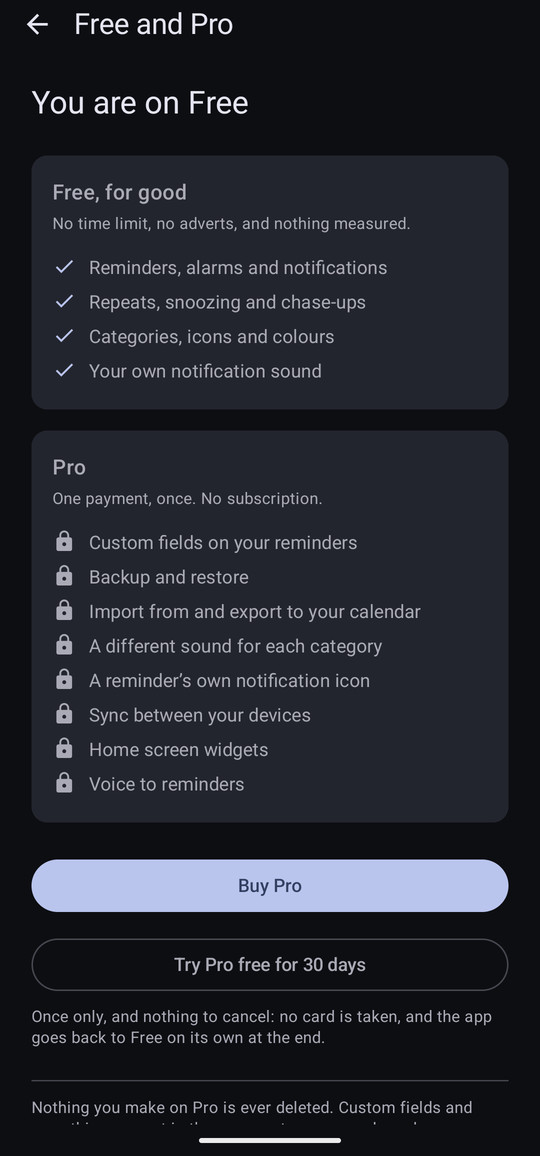
Everything the app is for is free:
- Reminders, alarms and notifications
- Repeats, snoozing and chase-ups
- Categories, icons and colours
- Your own notification sound
That last one matters more than it looks. A reminder app you cannot hear is not a reminder app, so choosing the sound every reminder uses is free. What Pro adds is a different sound for each category.
What Pro adds
Eight things, and this is the whole list. If something is not named here, it is free.
- Custom fields on your reminders
- Backup and restore
- Import from and export to your calendar
- A different sound for each category
- A reminder's own notification icon
- Sync between your devices
- Home screen widgets
- Voice to reminders
Pro also removes the twenty-reminder allowance described below.
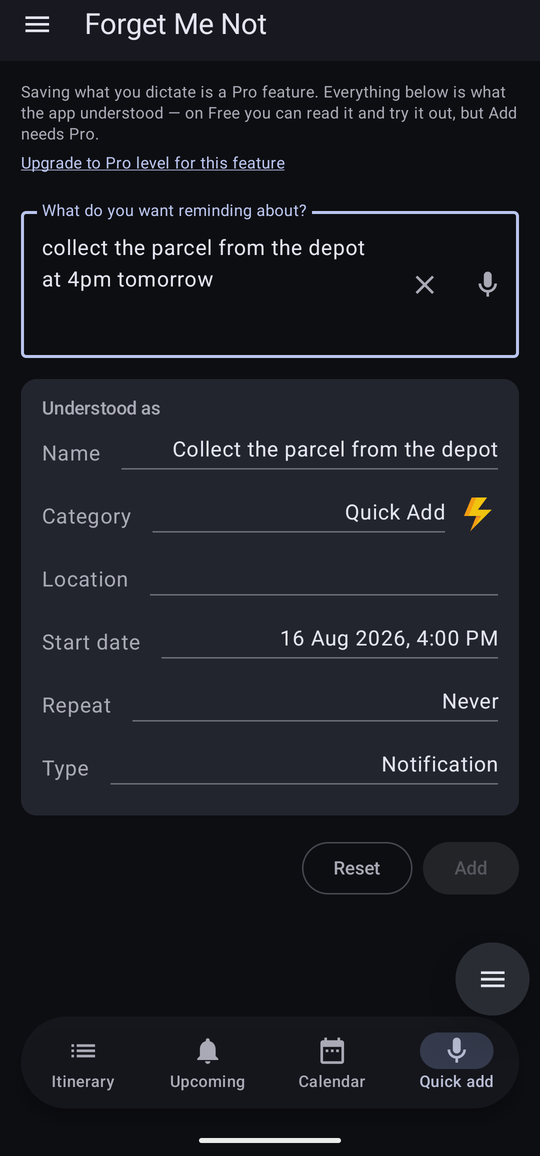
Quick add is worth singling out, because it is the one Pro feature you can try before you buy it — it is the part of the app least convincing as a description and most convincing when you use it. Dictate a line on Free and the app still pulls out the name, the date, the time, the repeat and the category, and shows you the lot. It is the Add button that saves the result which needs Pro.
Twenty reminders at a time
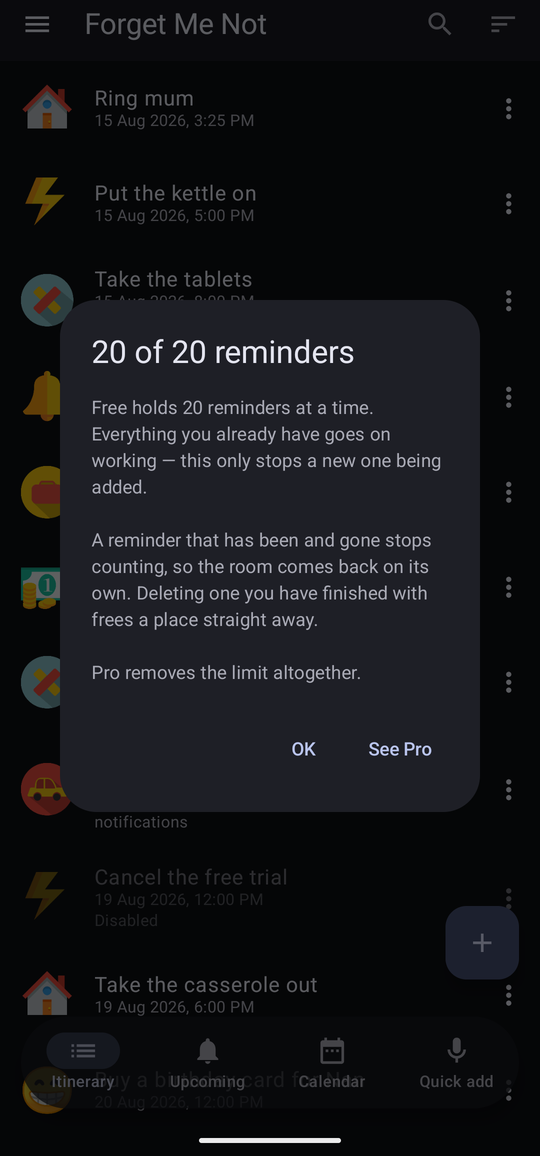
Free holds twenty reminders at once. The limit is on adding a twenty-first, never on keeping what you have — this is worth being precise about, because it is the opposite of how these limits usually work:
- If you already have more than twenty — because you used Pro, or the trial, or because you had the app before it worked this way — you keep every one of them, and every one goes on firing. Nothing is hidden and nothing is deleted. Only the next new one is refused.
- It counts reminders that are still live. A one-off that has been and gone stops counting on its own, so the room comes back without your doing anything. It is an allowance, not a bin that fills up for good.
- Editing a reminder you already have is never refused, even at the limit.
When you are at the limit, the + button still responds — it explains rather than doing nothing, because a button that silently ignores you reads as a broken app.
Telling which you are on
The drawer says so under the version number, in green: (Free) or (Pro). While the trial is running it says (Pro) with the days remaining beneath it.
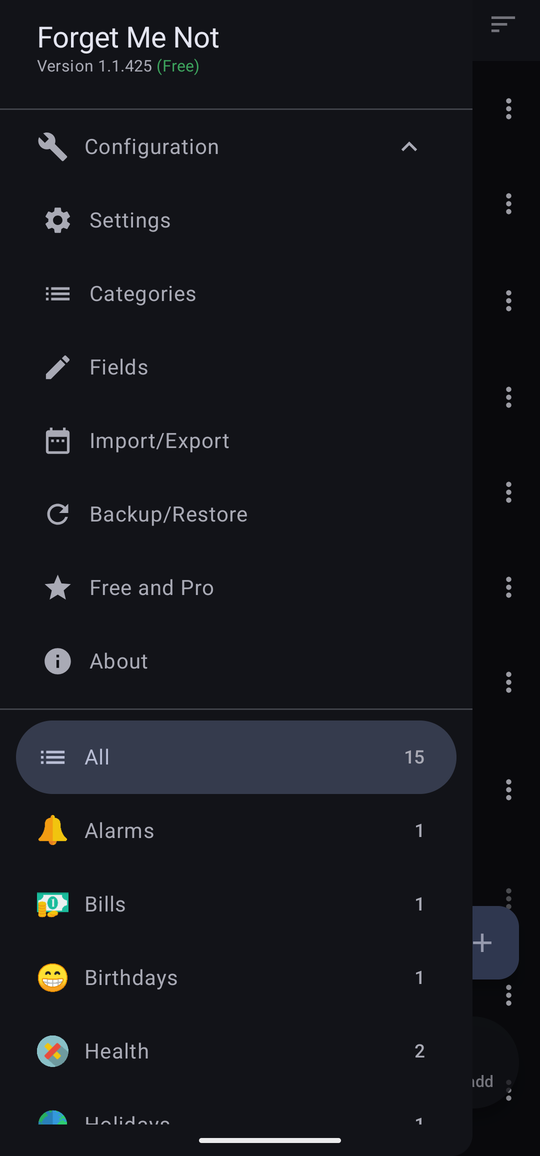

The full picture is on the Free and Pro screen, which is a row of its own in the drawer under Configuration — not buried in Settings.
What a Pro feature looks like on Free
Pro features are not hidden, and they are not advertised at you either. There are no nag screens and no banners, and nothing appears on a timer or on a count of how often you have opened the app. What happens instead is that the control itself is shown, greyed out, with one link under it reading Upgrade to Pro level for this feature. Tapping either the link or the dead control takes you to the Free and Pro screen.
Two things do interrupt, and only these two: the one-off note shown once to somebody updating from a version that had the old fourteen-day trial, and the dialog that explains the twenty-reminder allowance when you tap + at the limit. Neither comes back on its own.

Two of the eight are described rather than greyed out, for practical reasons. Sync needs a Google sign-in before there is anything to show, and the Import/Export screen is a list of the calendars on your device — which the app would have to ask permission to read purely in order to refuse to use them. Both say what Pro would do instead.
Two more work differently again, because they suppress an effect rather than a button:
- A reminder that was given its own notification icon falls back to its category's icon on Free — in the notification, on the itinerary and timeline rows, and in the editor. Every reminder still arrives with an icon; what Pro buys is choosing a different one for a single reminder.
- A category with its own sound falls back to the app-wide sound on Free, and the switch in the category reads off to match, rather than promising a sound that will not play.
In both cases the choice itself is kept, untouched, and comes back the moment Pro does.
The home screen widgets are the one Pro feature with no screen of its own to grey out — a launcher draws whatever it is handed, and there is no such thing as a dimmed widget. So a placed widget simply shows nothing on Free, rather than turning somebody's home screen into an advertisement. It stays where it was put and keeps the colours it was given, and the explanation is one tap away in its own settings, reached from Widget settings on the launcher's press-and-hold menu.
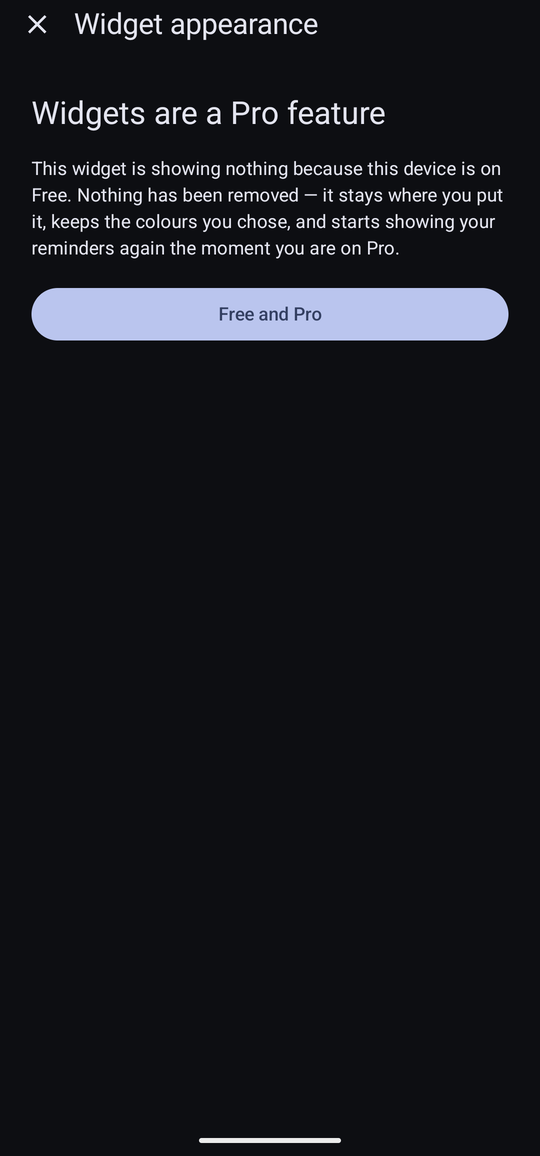
Adding a new widget on Free lands on the same screen, and closing it simply means the widget is never placed.
Nothing you make on Pro is deleted
This is the promise the whole arrangement stands on, so the app shows it to you rather than asking you to take it on trust. Custom fields are the case that proves it: a reminder you filled in during the trial keeps every value, and the reminder editor grows a second folding section on Free — Pro Settings, under Advanced — which shows them to you, dimmed, with the real field names on that reminder.
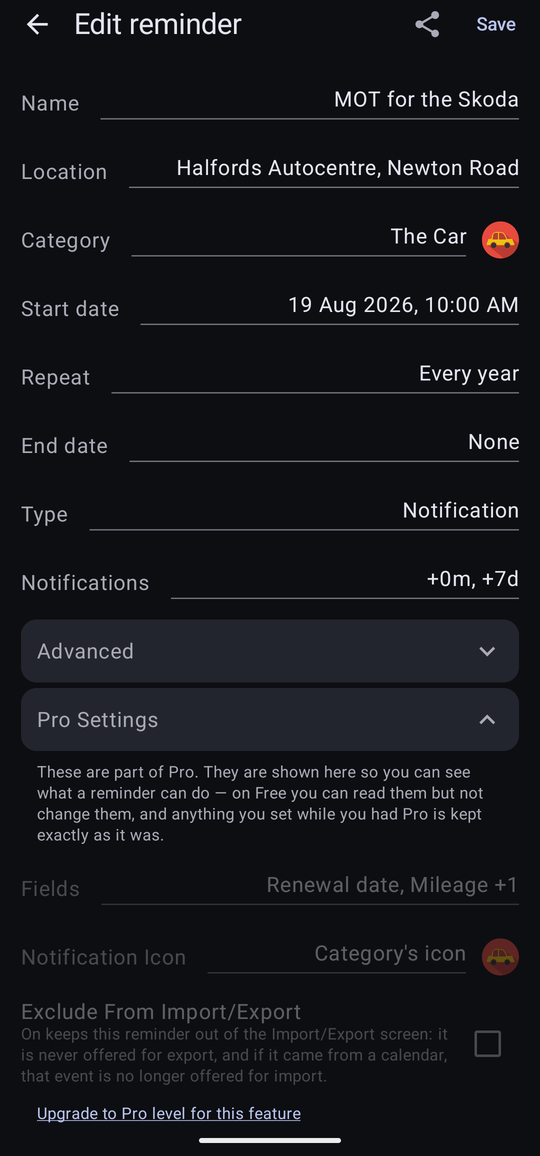
Underneath, every field definition and every value stays exactly where it was, travels in a backup, and comes back whole the moment Pro is bought, with nothing to re-enter. The same is true of per-category sounds, chosen notification icons, and your sync settings.
Two places stay quiet rather than showing you a greyed-out copy. The occurrence panel is a read-only summary, so its Fields section simply does not appear on Free; and a reminder somebody shares with you still keeps the fields the sender filled in — losing those would be a real deletion — but the arrival message stops listing them, since naming fields you cannot reach only sends you hunting for them.
The thirty-day trial
Pro can be tried free for thirty days. Two things about it are deliberate:
- It does not start by itself. The clock begins when you tap Try Pro free for 30 days on the Free and Pro screen, and not before. Install the app and never touch that button and you are simply on Free, with thirty days still waiting whenever you want them.
- There is nothing to cancel. No card is taken and no account is needed. At the end of the thirty days the device goes back to Free on its own.
It is once per device. Nothing gives it back, including the trial running out.
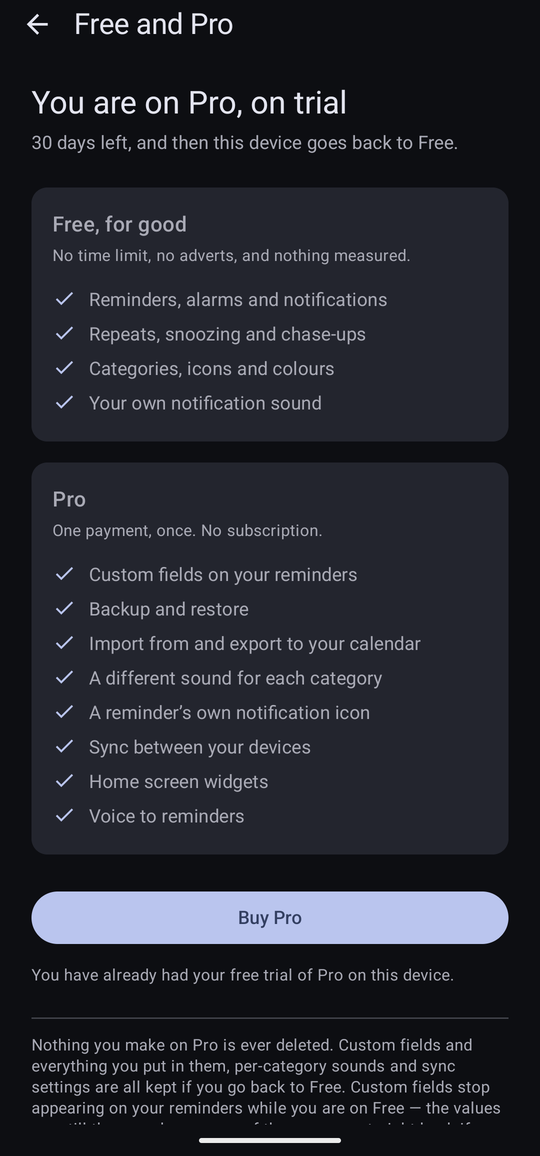
Going back to Free at the end is silent. There is no interstitial and no announcement — the app opens on your reminders as usual, and the Pro controls are simply dim again. If you want to keep a copy of everything before that happens, take a backup while the trial is still running.
Buying Pro
One payment, once. It is not a subscription, there is nothing to renew, and there are no adverts before or after. The button is on the Free and Pro screen, and every upgrade link in the app leads there.
Payment is handled entirely by Google Play. The app never sees your card details — see the privacy policy.
A payment that has not cleared
Not every way of paying clears straight away. A bank transfer, or cash paid at a shop, can take minutes or days, and Google Play does not confirm the purchase until the money has actually arrived.
When that happens the app tells you the payment has not cleared yet, and carries on as it was. It is not a refusal, and there is nothing to pay again — the app checks with Play each time it is opened, and switches Pro on as soon as the payment is confirmed.
A second device, and a new phone
The purchase belongs to your Google account, not to the phone. Sign in to the same account on another device, install the app, and Pro is on there too, with nothing to buy again. The same is true after a reinstall, or after moving to a new phone.
Your reminders do not travel with the purchase — having Pro on a device says nothing about what is on it. Moving them there is either a deliberate backup and restore, or turning on cross-device sync, which keeps them there automatically from then on.
The thirty-day trial is remembered per device rather than per account, and it survives a reinstall on the same Google account.
When Google Play cannot be reached
The app asks Google Play whether Pro has been bought. It does this quietly, in the background, and it is the only thing the app uses the network for unless you turn sync on; your reminders are no part of that conversation.
If Play cannot be reached — no signal, aeroplane mode, a Play Store that will not start — nothing moves between tiers. A device on Pro stays on Pro: being offline never takes away something you have paid for. A device on Free stays on Free and goes on working, because Free is a working app and there is nothing to hold up.
The one case worth naming is a device that has bought Pro but has never once managed to ask Play about it — a new phone put straight into aeroplane mode, say. There the Free and Pro screen says Play could not be reached, rather than inviting you to buy something you already own. Connect to the internet and open the app again.
If you had the app before
Forget Me Not used to be free for fourteen days and then bought once. If you have been using it since then, the app shows you a one-off note explaining what has changed. The short version is that it is now free, permanently, and that the fourteen-day countdown and everything that enforced it are gone.
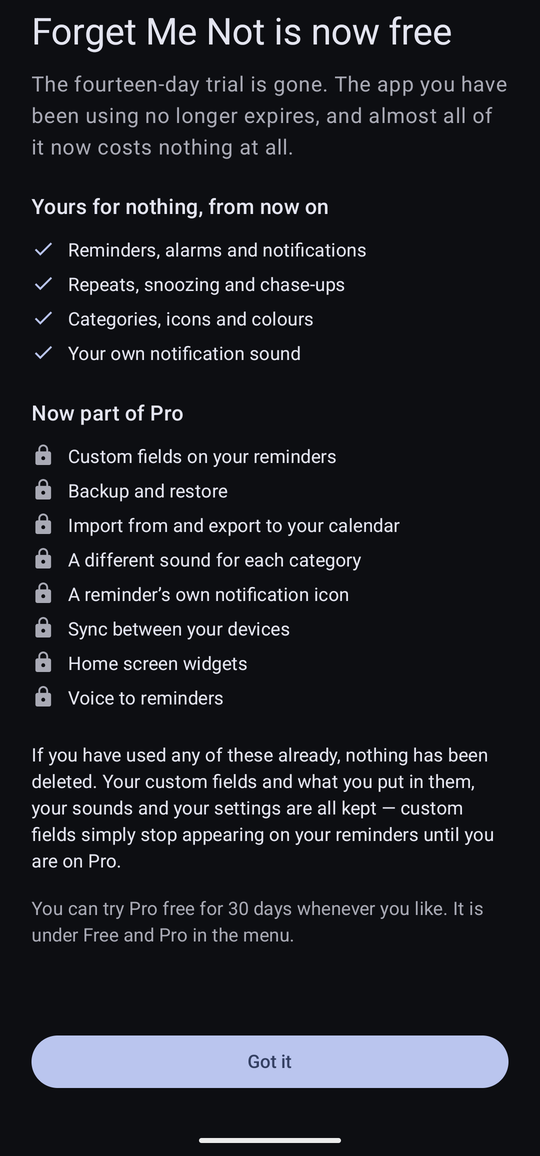
If you bought the app under the old arrangement, you have Pro. There is nothing to do and nothing to pay. If you were part-way through the fourteen days, the countdown is simply gone: you are on Free, with the thirty-day trial of Pro still available whenever you want it.
Nothing you made under the old arrangement has been touched — including custom fields and everything in them, which are kept in full and shown to you under Pro Settings on each reminder.