 Forget Me Not
User manual · Chapter 14
Cross-device sync
The same reminders on a phone and a tablet, kept in step through the Google account you already sign in to Play with. Entirely optional, and off until you turn it on.
Turning it on
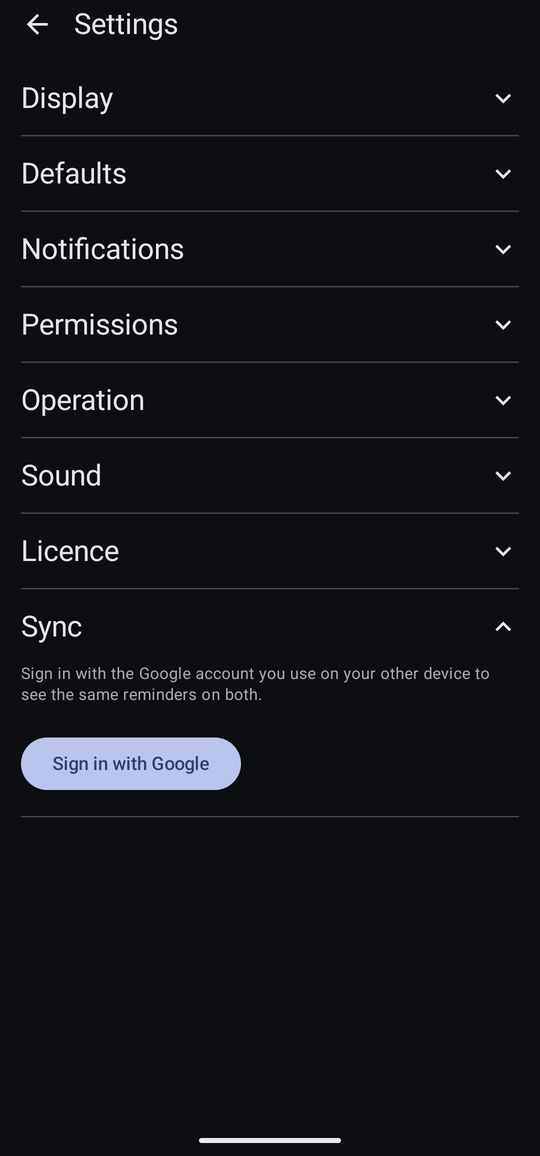
Drawer → Configuration → Settings → Sync, then Sign in with Google. Choose an account from the picker Android offers — the same one on both devices is what makes them sync with each other — and that is the whole of it. The section then reads “Signed in as …”, with a Sign out button and, once a sync has actually run, how long ago it last did.
Nothing is sent anywhere until this is turned on. Left alone, the app behaves exactly as it always has — see the privacy policy for what changes, and what does not, once sync is switched on.
What syncs, and what does not
| Syncs | Stays on the device |
|---|---|
| Reminders — every field on them, including their fields and notifications | Everything under Settings — Display, Defaults, Notifications, Operation and Sound. Two devices can look and behave differently on purpose, a tablet set up for a bigger screen alongside a phone set up for a pocket. |
| Categories and fields, with their icons and colours | The large copy of a custom photo icon. Only the smaller copy syncs, so an icon set from a photo looks a little softer wherever the app shows it large — the alert panel, mainly — on a device that received it rather than where it was cropped. |
| Whether a reminder has been dismissed, snoozed or skipped | A category's own notification sound — Android keeps that with the device's own notification channels, the same reason a backup does not carry it either. |
A reminder dismissed on one device shows as dismissed on the other within moments of both being online — including one dismissed automatically because it was never answered. This is convenient, and it has one honest trade-off: if both devices are offline and someone dismisses a reminder on one while snoozing the very same occurrence on the other, only one of those survives once they are both back online. Which one is whichever reached the account last — not necessarily whichever was tapped first by the clock, since it is decided by when each device's change actually arrives, not by the device's own clock.
When both devices already have something
Signing in for the first time on a device that already has its own reminders, where the account has already got reminders too — from having synced on another device already — is the one moment the app stops and asks rather than choosing for you, with a dialog headed “Combine your reminders?”:
- Keep both — combines them. Nothing on either side is deleted; a category that exists in both places by name becomes one shared category rather than two.
- Use synced data only — replaces what is on this device with whatever the account already has. Use it on a fresh phone you want to start already matching the other one, rather than merging in whatever happened to be on it before.
- Cancel — backs out and signs out again. Nothing is written anywhere, and the device is left exactly as it was before Sign in with Google was tapped.
The first time either device signs in, with the account itself still empty, there is nothing to choose between — it is a plain, one-way copy up, and this dialog never appears.
Pausing it
Sign out pauses sync rather than turning it off. Local data on that device is left exactly as it stood — nothing is deleted, nothing is un-synced — and reminders made while signed out simply do not go anywhere until sync resumes. Signing back in with the same account resumes it quietly, catching up on anything either side missed, with no repeat of the choice above.
Worth it even on a single device
This exists for keeping two devices in step, but it is worth turning on even for somebody who only ever uses one. Signed in, your reminders are recoverable if the phone is lost, reset, or replaced — an incidental backup that updates itself, on top of the deliberate kind covered in Backup and restore, not instead of it.
What it needs
| Pro | Sync is one of the eight Pro features, so it needs Pro or the thirty-day trial. If the trial ends while sync is on, it pauses the same way signing out does, and picks back up on its own once Pro is bought — nothing is lost either side, and the reminders on this device are untouched throughout. |
|---|---|
| A Google account | The same one on every device that should share reminders. It does not have to be the account Play knows the purchase by, though it usually will be. |
| A connection, when something changes | Editing offline still works exactly as normal — the change is simply carried across the next time that device can reach the network, with no further action needed. |