
Your photos, off the camera and into order
Photo Flux imports photos straight from your camera or memory card to your Android phone or tablet — no computer, no cloud round-trip, no waiting until you get home — and organises them exactly how you want them as they arrive.
Free on Google Play, with an optional one-off Pro upgrade — no subscription.

What it does
Plug a camera into your phone over USB, or a memory card in a reader, and Photo Flux copies your shots into a folder you choose — reading their metadata, pairing RAW with JPEG, naming where each was taken, and filing them into folders and under names you set up once.
-
Built for photographers
Imports from PTP/MTP cameras over USB and from SD cards and drives. RAW+JPEG pairs stay together as one photo, and RAW previews are extracted so you can see shots you haven't processed.
-
Organised on the way in
Profiles bind a camera or card to a folder. Sort into subfolders by date, camera, lens, file type or place, rename as files arrive, and stack bursts automatically.
-
Cull and find
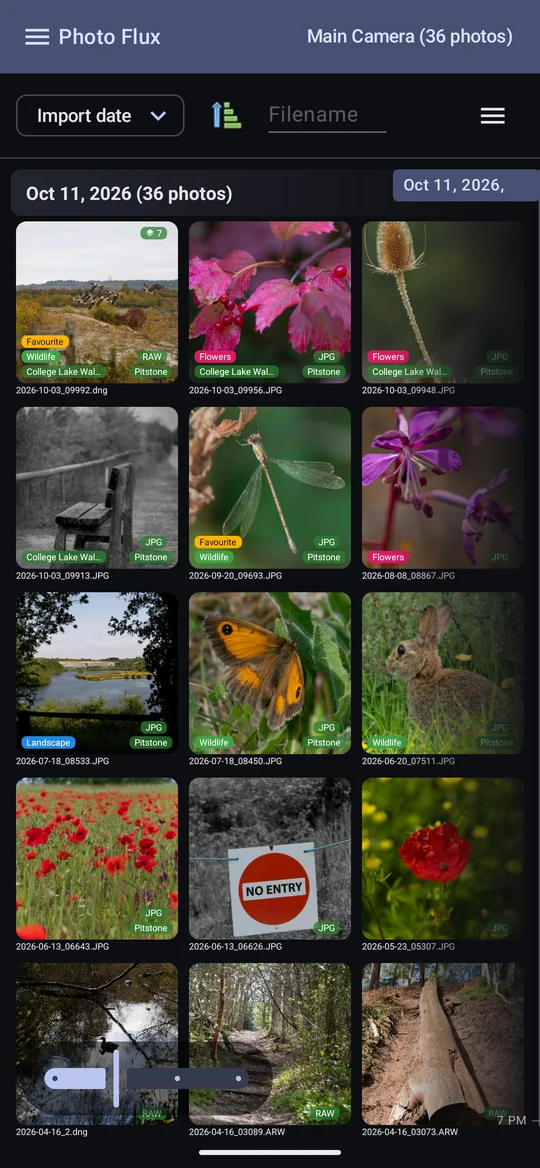
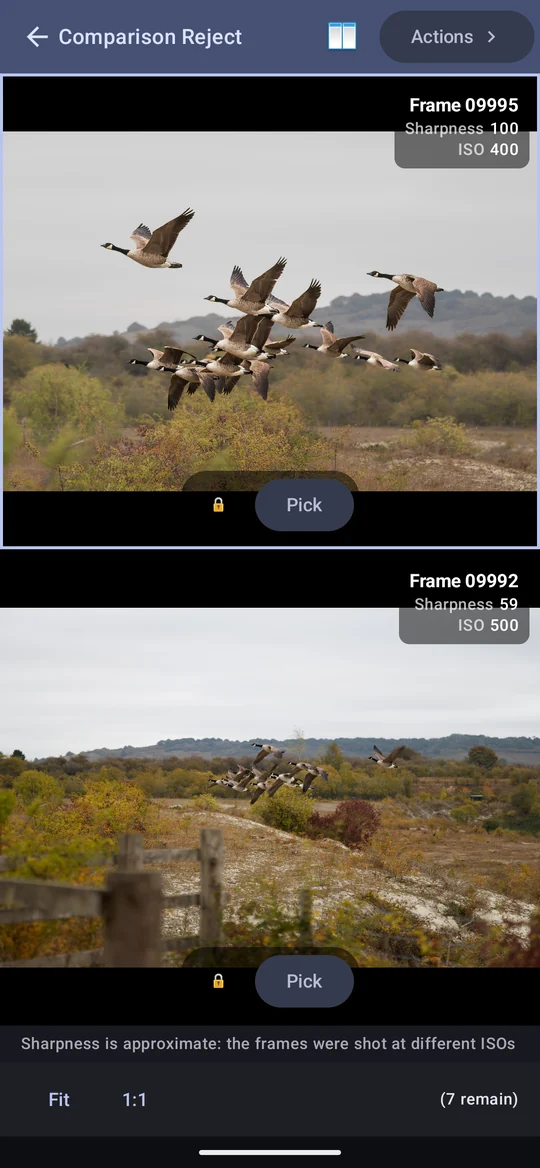
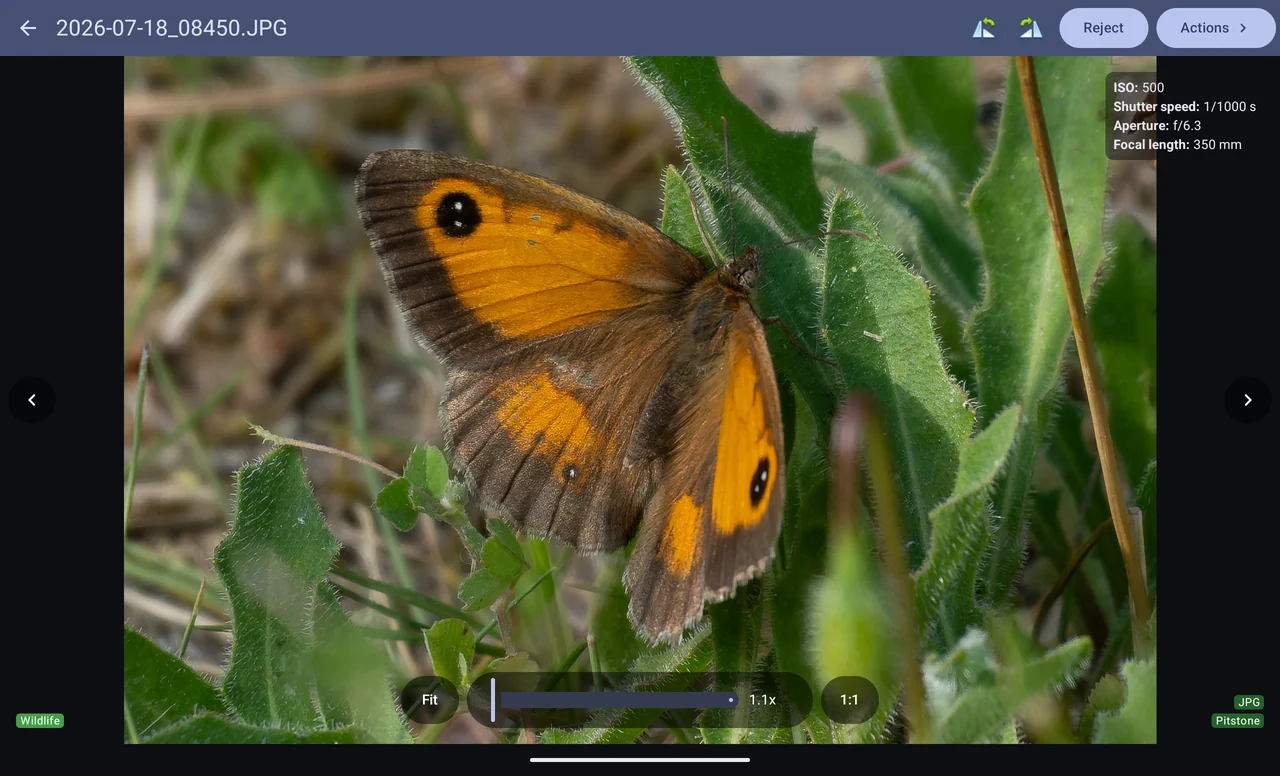
A fast gallery and viewer, tags, events, titles and filters. Comparison Reject shows two frames with zoom locked together, sorted by measured sharpness, and duplicates are found for you.
-
Maps and tracks
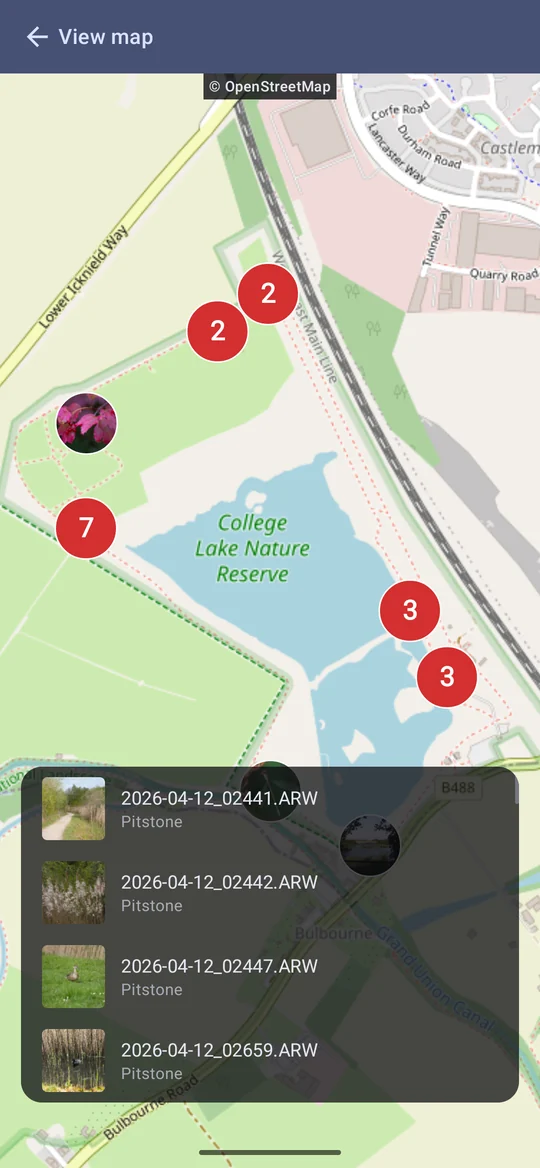
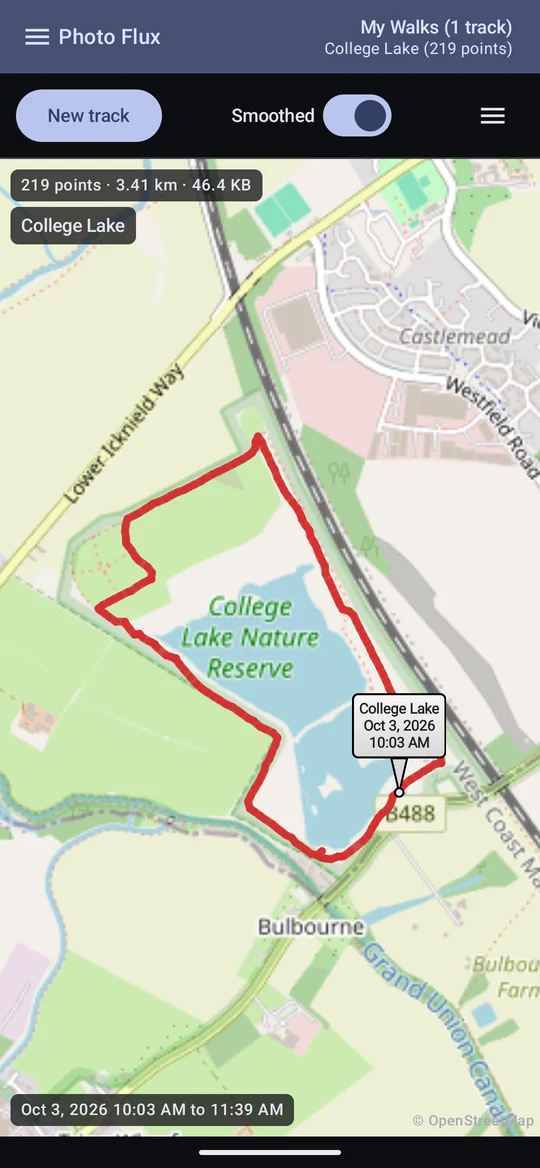
Place names worked out entirely offline. See photos on a map, record a GPS track of your walk, place a GPS-less camera's photos on it, or feed a Sony camera the phone's position as you shoot.
-
Send them on
Export to a NAS or server (SMB, FTP, SFTP, SCP, WebDAV), to OneDrive or Google Drive, or to a USB drive. Pass-Thru sends a whole card straight to a server and keeps nothing on the phone.
-
Metadata that travels
Tags, places, titles, crops and rejects are written into JPEGs and DNGs, and into XMP sidecars for RAW — so Lightroom, Bridge and darktable see your work.
-
At home on a tablet
A tablet isn't a stretched phone: profiles stay in a side panel, frames are compared side by side, and forms spread across the screen.
-
Your photos stay yours
No account, no adverts, no analytics, no tracking. Your photos go nowhere except the destinations you set up yourself.
A look around

Documentation
The user manual covers every screen in the app. Start at Getting started if Photo Flux is new to you.
-
Chapter 1
Getting started
The welcome guide, the storage folder, the permissions Photo Flux asks for and why, and finding your way around the main screen.
-
Chapter 2
Profiles
The five kinds of profile, the new-profile wizard, copying a profile, and everything in the profile editor.
-
Chapter 3
Importing photos
Connecting a camera, card or drive, running an import, adding or mirroring, events, and what happens when space runs out.
-
Chapter 4
Folders, renaming and modifiers
Sorting photos into folders and renaming them on the way in, the Creator modifier and licences, and geotagging from a track.
-
Chapter 5
The gallery
The photo grid and its badges, sorting and filtering, stacks, selecting photos and the Actions panel.
-
Chapter 6
The photo viewer
Viewing one photo, the EXIF overlay, the metadata screens, crop and rotate, editing, and sharing.
-
Chapter 7
Tags, events, titles and locations
Labelling photos one at a time or a whole selection, and what each label does to your files.
-
Chapter 8
Archive profiles and albums
Albums you fill by hand, Album Import from a card, drive or connector, and moving or copying photos into an album.
-
Chapter 9
Culling: reject, compare, duplicates
Rejecting photos, Comparison Reject and Compare Stack, sorting by sharpness, finding duplicates and similar photos.
-
Chapter 10
The map and locations
Nearest-place names, seeing photos on a map, moving a photo's location, and naming places yourself.
-
Chapter 11
Tracklogs
Recording where you walked, smoothing and trimming a track, GPX files, and sharing a track as a map.
-
Chapter 12
Camera GPS link
Sending this phone's position to a Sony camera over Bluetooth, so every photo is geotagged as it is taken.
-
Chapter 13
Metadata and Lightroom
What Photo Flux writes into your files, XMP sidecars, rejects that travel to Lightroom, and rebuilding or rescanning metadata.
-
Chapter 14
Connectors and export
Sending photos to a NAS, a server, OneDrive, Google Drive or a USB drive — every connector type, and exporting on the road.
-
Chapter 15
Pass-Thru profiles
Sending a card's photos straight through a connector without keeping them, and reading the send log.
-
Chapter 16
File Monitoring
Being told when something outside Photo Flux changes, moves or deletes one of your photos.
-
Chapter 17
Settings
Every settings page — Display, Units, Operation, Storage Folder, Known Devices and Help — plus Tags, Locations, licences and About.
-
Chapter 18
Free and Pro
What the free app does, the thirteen things Pro adds, the trial, and what happens if you go back to Free.
-
Chapter 19
Troubleshooting
Symptoms and their causes: imports that find nothing, photos without locations, exports that fail, and more.
Change history
What has changed, in terms of what you can do with Photo Flux, newest first. The version number is shown at the top of the drawer and in About.
-
In developmentVersion 1.2
- The Edit panel replaces Colour in the photo viewer's Actions. It sits beside the photo — along the bottom when the device is upright, down the side when it is turned — with Light and Colour sections, a histogram with clipping warnings, before and after, and undo. White balance gains Auto and an eyedropper, and there is a new Vibrance slider.
- Tone curve, colour mixer and colour grading in the Edit panel: a parametric and point tone curve, eight colours to change on their own, and grading wheels for shadows, midtones and highlights. A B&W switch turns a photo black and white.
- Effects in the Edit panel, with Pro: Texture, Clarity and Dehaze, a vignette that follows the crop, and film grain that stays the same every time the photo is shown.
- Presets and copy/paste in the Edit panel, with Pro: save a look as a preset, or copy one photo's edits and paste them onto another or onto a whole selection.
- Perspective and lens correction in the Edit panel, with Pro: straighten leaning buildings, or draw lines along edges that should be straight and let Guided Upright work it out; correct distortion, lighten dark corners and take out colour fringes. The crop is kept inside the corrected photo.
-
November 2026Version 1.1
- Export processing: keep sensitive places private. On a profile or a connector, choose to take the GPS coordinates and the place names out of every copy that leaves the app. The photos in the app keep theirs.
- Maker notes: a camera maker's private notes can hold a position too. Remove maker notes from JPEGs takes them out of JPEGs. Sharing a file that may still have them asks first, and an export's result says how many files kept them.
-
November 2026Version 1.0
- Colour in the photo viewer's Actions: temperature, tint, exposure, contrast, highlights, shadows, whites, blacks and saturation, each on a slider you watch the photo change with. Non-destructive, and read and written the way Lightroom does.
- Crop & rotate is now one editor: drag the crop and level or turn the photo in the same place, and the crop only pulls in as far as levelling needs.
- Restore purchase on Free and Pro: if Pro you've bought, or a promo code you've redeemed, hasn't arrived on this device, it checks with Google Play straight away and tells you what it found. Most often that is a Play Store on a different Google account.
- What's new after an update: the first time you open a build with new features, a page lists them before the app. You see each one once; an update that only fixes things shows nothing.
-
October 2026Testing builds 0.1.1148 – 0.1.1224
- The phone's own camera as an import device: a camera button on the gallery opens your camera app, and each photo you take is imported as it is saved.
- Contact support, under Configuration: write a subject and message and Photo Flux hands them to your own email app, with the app's details added (and your device's, if you leave that ticked).
- Free and Pro lists every Pro feature, puts Buy Pro and Try Pro at the top, and shows your Google Play order ID once you've bought Pro. A purchase made outside the app, such as a redeemed promo code, is picked up the next time you open it.
- Stacks: the filename filter finds photos inside stacks; a stack's tile shows its first photo you haven't rejected; Keep only this returns to the gallery; and an open stack's title bar reads Photo Stack, with its back arrow and photo count.
- Day headings, the title bar and album counts now count photos, every frame of a stack included.
- Card and drive imports wait until Photo location is really allowed, so a first import can't lose its photos' GPS.
- The drawer has a title bar of its own, with a back arrow that closes it. About's View Documentation opens this manual.
- New installs come with the predefined Creative Commons licences.
- Fixes for Android 8: the keyboard no longer pops up when the app opens or the gallery scrolls, a double tap returns a zoomed photo to fit, and the viewer's 1:1 button fits on narrow screens.
-
October 2026Testing builds 0.1.1088 – 0.1.1120
- Pass-Thru profiles Pro: a camera's or card's photos sent straight through a connector with folders, renaming and metadata applied, and nothing kept on the phone — just a log of what was sent, by day, place and connector.
- OneDrive: export to and import from your OneDrive, signing in on Microsoft's own page; every upload checked against OneDrive's own record of it.
- Google Drive: export to and import from a Photo Flux folder of its own in your Drive.
- What to send, per connector: all files, RAW and XMP only, JPEG only, or JPEG as edited.
- Exporting on the road: a large export on mobile data asks first, a lost connection pauses and resumes, and a dropped connection is retried.
- Share Map Image for tracks, with the date, distance, average speed and a scale; a Speed unit setting.
- Comparison Reject sorts by apparent sharpness, with a heatmap and "reject frames below N%".
- Duplicate existing for connectors, and Copy a Profile in the new-profile wizard.
- Stacks you make yourself show whether or not automatic stacking is on.
-
September 2026Testing builds 0.1.930 – 0.1.1070
- Duplicate detection Pro: identical and look-alike photos across profiles and albums, resolved by rejecting — never deleting — and Find similar images.
- File Monitoring Pro: told when another app changes, moves or deletes a photo.
- The new-profile wizard, one question at a time.
- The storage folder: one PhotoFlux folder holding Import, Albums and Tracks.
- Known Devices, listing every folder Photo Flux may use, and Album Import's drive access explained.
- The camera GPS link: a Sony camera fed this phone's position over Bluetooth.
- The location stabiliser: a phone standing still no longer adds distance to a track.
- Rescan metadata finds photos whose files have gone. Imports from subfolders. Lightroom and Photoshop exports no longer shown cropped twice.
-
6 September 2026First testing build, 0.1.752
- Importing from USB cameras and card readers into profiles, with folder filters, renaming, RAW+JPG pairing and RAW previews.
- The gallery and viewer, tags, events, titles, nearest-place names, archive profiles and albums, export to network shares and USB drives, and XMP sidecars.
- Free, with a one-off Pro upgrade and a thirty-day trial.
Support
If something is wrong, or Photo Flux doesn't do what you expected, write to support@sherwood-tech.co.uk. It helps a great deal to say which phone or tablet you are using, which version of Android, the version number shown at the top of the drawer, and the camera or card reader involved. Troubleshooting covers the common causes and is worth a look first.
| App | Photo Flux |
|---|---|
| Price | Free, permanently. An optional Pro upgrade is a one-off purchase — no subscription — with a thirty-day free trial |
| Made by | Sherwood Technology |
| Support | support@sherwood-tech.co.uk |
| Needs | Android 8.0 or later, on a phone or tablet. USB host support to import straight from a camera |
| Advertising | None, and no tracking or analytics either |
| Your data | Stays on your device. No account and no servers of ours; photos leave the device only to destinations you set up yourself. The privacy policy says this formally, and the terms of use cover the rest. |